Disclosure: This page may contain affiliate links. I may earn a commission at no extra cost to you if you purchase through one of these links.
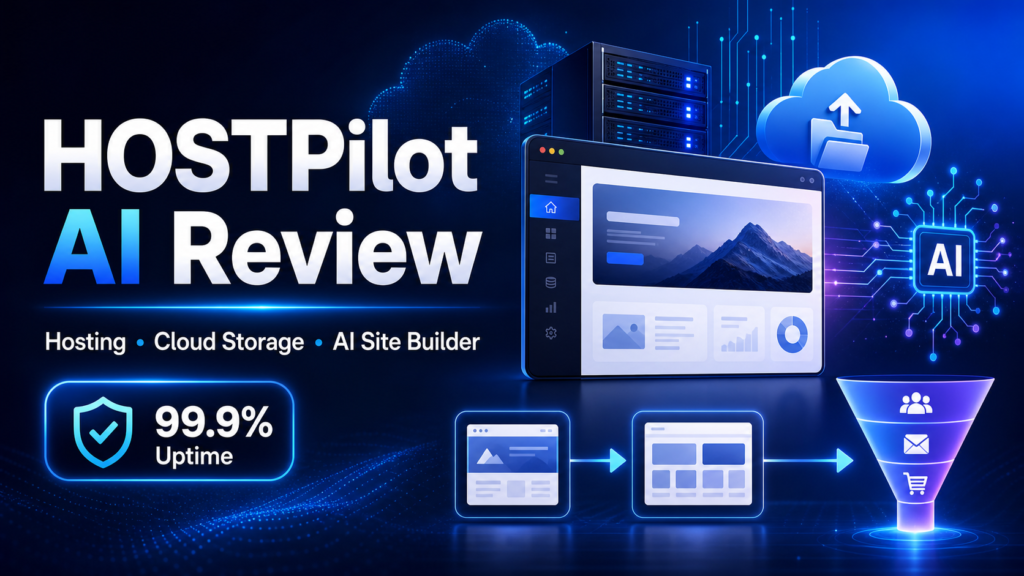
Building an online presence often means paying separately for hosting, cloud storage, a website builder, and funnel software. HOSTPilot AI aims to simplify that setup by bringing these functions into one platform. It is promoted as a 3-in-1: Limitless Hosting With 99.9% Uptime, Cloud Storage & AI Website + Funnel Creation solution for marketers, freelancers, and small online business owners.
That combination may sound attractive, especially if you want to avoid several recurring subscriptions. However, words such as “limitless” and “unlimited” should always be considered alongside the provider’s current terms, resource policies, and acceptable-use rules. This review looks at what HOSTPilot AI claims to offer, where it may be useful, and what you should verify before purchasing.
Affiliate disclosure: This article contains an affiliate link. If you buy through it, the publisher may earn a commission at no additional cost to you. This does not affect the points you should evaluate before making a decision.
What Is HOSTPilot AI?
HOSTPilot AI is presented as an AI-based hosting platform that combines three major services: website hosting, file storage, and AI-assisted creation tools. According to its promotional information, users can create and host websites and funnels while storing files on secured servers.
The offer also advertises features such as free SSL, DDoS protection, data security, cPanel access, and no monthly hosting fee. Its sales messaging refers to “100+ AI based hosting technology,” although prospective customers should check the product page or dashboard documentation to understand exactly what that description includes.
The main appeal is convenience. Instead of managing a hosting account, a separate page builder, and another cloud storage service, users may be able to handle more of their work from one system. LocalGenie AI Review: Instantly Builds Hosts, and Sells AI-Optimized Local Websites
The Three Main Parts of HOSTPilot AI
1. Website and Funnel Hosting
HOSTPilot AI advertises the ability to create and host unlimited websites and funnels. This could be useful for someone managing several small projects, client sites, lead-generation pages, or campaign-specific landing pages.
“Unlimited” hosting rarely means that server resources are literally without limits. Hosting services commonly apply restrictions involving bandwidth, CPU use, storage, file counts, prohibited content, or fair-use policies. Before relying on HOSTPilot AI for a large number of websites, review its current terms and ask support how resource limits are handled.
The promoted 99.9% uptime is another relevant consideration. Uptime describes how consistently a hosting service remains accessible, but no server environment can eliminate every interruption. Check whether the 99.9% figure is a target, a historical measurement, or part of a formal service commitment.
2. Cloud File Storage
The cloud storage component is designed to give users a place to upload and manage files. A small business might use it for website images, downloadable guides, promotional graphics, PDFs, video assets, or client materials.
Centralizing files may reduce the need to move repeatedly between a hosting dashboard and a separate storage provider. It can also make website production more convenient when your assets and site-building tools are available through the same platform.
Before storing important or sensitive files, investigate the storage allowance, maximum file size, backup system, retention policy, access controls, and data export process. Security features are helpful, but you should still maintain independent backups of business-critical files.
3. AI Website and Funnel Creation
The AI-assisted builder is intended to make page creation more approachable for beginners. Rather than starting with a completely blank page, a user may be able to use AI tools to help structure websites, landing pages, or funnels.
AI can speed up brainstorming and first drafts, but its output still needs human review. Check headlines for accuracy, rewrite generic content, confirm that calls to action match your offer, and make sure every page reflects your brand. AI-generated pages do not automatically attract visitors or produce sales.
A funnel is simply a planned sequence that guides a visitor toward an action. For example, a basic funnel might include a landing page, an email sign-up form, a thank-you page, and an offer page. The quality of the offer, audience targeting, page clarity, and follow-up strategy will still influence performance.
Other Advertised Features
Free SSL
SSL helps encrypt information transferred between a visitor’s browser and a website. It also enables the familiar HTTPS connection. Free SSL can remove an extra setup step, but confirm whether certificates are issued and renewed automatically for every connected domain.
DDoS Protection and Data Security
HOSTPilot AI promotes DDoS protection and secured servers. DDoS protection is intended to reduce the impact of malicious traffic designed to overwhelm a website. No security system removes every risk, so users should also apply strong passwords, limit account access, update connected software, and keep backups.
cPanel Access
cPanel is a familiar hosting control panel used for managing domains, files, databases, email settings, and other server functions. If full cPanel access is important to you, verify exactly which cPanel features are included. Some platforms use customized or limited implementations rather than a conventional standalone hosting account.
No Monthly Fees
The product is advertised with no monthly fees, which may appeal to business owners trying to reduce recurring software costs. Treat this as an offer-specific claim rather than assuming every future feature or upgrade is included forever. Review the checkout page for optional upgrades, usage-based charges, domain costs, renewal requirements, and third-party expenses.
Who May Find HOSTPilot AI Useful?
HOSTPilot AI may suit beginners who want to launch a basic website without assembling a complicated technology stack. It may also interest affiliate marketers, local service providers, freelancers, digital product creators, and small agencies managing multiple simple sites.
For example, a freelance designer could build separate portfolio pages for different services and store reusable image assets in the same platform. A local consultant could create a main website plus a focused landing page for appointment requests. An affiliate marketer could build a comparison page and supporting resource pages, provided all promotions include appropriate disclosures.
The platform may be less suitable for organizations with complex infrastructure requirements, custom server configurations, strict compliance obligations, or high-traffic applications. In those cases, specialized managed hosting or a dedicated cloud environment may offer more control. LocalGenie AI Review: Instantly Builds Hosts, and Sells AI-Optimized Local Websites
Practical Steps for Using HOSTPilot AI
Step 1: Define One Clear Website Goal
Decide what the website should help visitors do. That goal might be requesting a quote, joining an email list, reading educational content, or viewing a product offer. Avoid adding unnecessary pages before the core path works.
Step 2: Plan a Simple Page Structure
A beginner-friendly business website might include a home page, about page, service or product page, contact page, privacy policy, and terms page. A funnel may need only a landing page, form, thank-you page, and follow-up message.
Step 3: Use AI for a First Draft
Give the AI tool clear information about your audience, offer, tone, and desired action. Use the result as a starting point, not finished copy. Remove unsupported claims, add useful details, and make the language sound like your business.
Step 4: Connect Security and Domain Settings
Connect your domain, activate SSL, and verify that pages load over HTTPS. Use a unique password and enable any available account security options. Confirm that forms and integrations send data to the correct destination.
Step 5: Optimize the Visitor Experience
Check the site on desktop and mobile devices. Compress large images, use readable text, keep navigation simple, and test every button. If a page loads slowly or confuses a first-time visitor, simplify it.
Step 6: Create a Backup Routine
Do not assume that server security replaces backups. Keep copies of important text, images, customer-approved files, and downloadable products in an independent location. Ask support how website restoration and file recovery work.
Step 7: Measure and Improve
Use suitable analytics or tracking tools to understand how visitors interact with your pages. Test one meaningful change at a time, such as a clearer headline or shorter form. Results will depend on factors including audience quality, offer relevance, trust, traffic sources, and execution.
Important Questions to Ask Before Buying
- What does “unlimited” cover, and what fair-use limits apply?
- How much cloud storage is included with the base purchase?
- Are bandwidth, CPU, database, or file-count limits documented?
- Does the 99.9% uptime statement include a service-level commitment?
- Is cPanel access full, shared, or limited?
- Are SSL certificates automatically renewed?
- How are websites and files backed up and restored?
- Can you export a website if you later move to another host?
- Which AI features are included in the standard package?
- Are there optional upgrades or third-party costs?
- What support channels and response hours are available?
- What refund policy applies at the time of purchase?
Taking a few minutes to confirm these details can prevent mismatched expectations. Save a copy of the offer terms and any support answers that are important to your decision.
Potential Advantages and Limitations
Potential Advantages
- Hosting, storage, and creation tools are presented in one platform.
- AI assistance may reduce the difficulty of producing a first page draft.
- Free SSL and advertised security features can simplify setup.
- Support for multiple websites and funnels may help users with several projects.
- A no-monthly-fee offer may reduce recurring costs if the included resources meet your needs.
Potential Limitations
- “Unlimited” services may still be governed by resource and fair-use restrictions.
- AI-generated content and layouts require editing and fact-checking.
- The platform will not create traffic, rankings, leads, or revenue by itself.
- Advanced users may need more server control or specialized integrations.
- Optional upgrades, domains, email tools, or external services may add costs.
Is HOSTPilot AI Worth Considering?
HOSTPilot AI presents an appealing concept for users who want hosting, cloud storage, and AI-assisted site creation without maintaining several separate subscriptions. The combination could be practical for straightforward websites, landing pages, portfolio sites, and small marketing funnels.
Its value depends on the actual resource allowances, builder quality, support, export options, and current purchase terms. Beginners should not buy solely because of words such as “limitless” or “AI.” Compare the included features with your specific project and verify the policies that matter to you.
Conclusion
HOSTPilot AI aims to make website creation and hosting more accessible by combining three commonly needed tools. Free SSL, advertised DDoS protection, cPanel access, cloud storage, and AI page creation could provide a convenient starting point for a small online business.
Still, the platform is a tool rather than a shortcut to business results. You will need a useful offer, accurate content, clear design, responsible promotion, backups, and ongoing improvement. If the current feature limits and terms suit your needs, you can review the HOSTPilot AI offer and pricing here. Read the sales page, checkout details, usage policies, and refund terms before purchasing.
Frequently Asked Questions
What is HOSTPilot AI?
HOSTPilot AI is promoted as a combined website hosting, cloud storage, and AI website and funnel creation platform. It is intended to reduce the need for several separate tools.
Does HOSTPilot AI really provide unlimited hosting?
The offer advertises unlimited websites, funnels, and files. However, unlimited hosting commonly operates under fair-use and server-resource policies. Check the current terms for storage, bandwidth, CPU, file, and account restrictions.
Does HOSTPilot AI guarantee 99.9% uptime?
HOSTPilot AI is promoted with 99.9% uptime. Prospective users should verify whether this is a target, historical figure, or contractual service-level commitment. No hosting environment can guarantee that interruptions will never occur.
Can beginners use the AI website builder?
The AI-assisted approach is intended to make initial website and funnel creation easier. Beginners should still review generated pages, verify claims, test forms, and adjust the design for their audience.
Are there really no monthly fees?
The offer is advertised as having no monthly hosting fees. Check the current checkout terms for optional upgrades, domain registration, third-party services, usage charges, or other expenses not included in the base purchase.
Will HOSTPilot AI bring traffic or make sales?
No platform can promise traffic, rankings, leads, or sales. HOSTPilot AI may help you create and host web pages, but outcomes depend on your offer, content, audience, promotion, trust, and ongoing optimization.