Disclosure: This page may contain affiliate links. I may earn a commission at no extra cost to you if you purchase through one of these links.
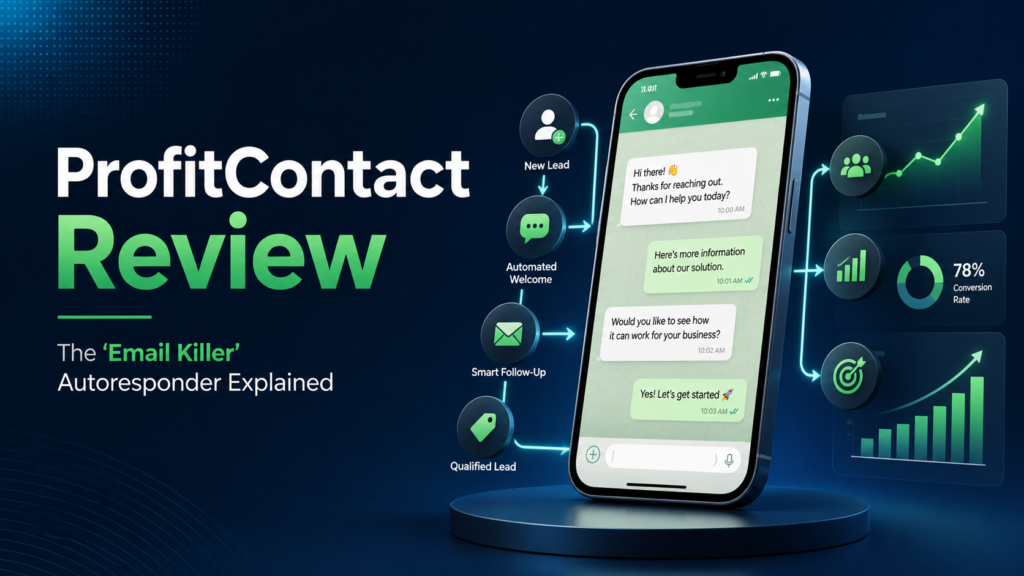
ProfitContact is promoted as a brand-new “Email Killer” WhatsApp autoresponder that lets you blast any link to millions. That is an attention-grabbing promise, especially for marketers who struggle with low email engagement. However, responsible WhatsApp marketing involves more than purchasing software and sending a large number of messages. You need permission-based contacts, a relevant offer, clear opt-out options, and an approach that follows applicable platform rules and privacy laws.
This ProfitContact review explains what the offer appears to be designed for, how a WhatsApp autoresponder can fit into a small-business marketing plan, and what you should investigate before buying. Product features, usage limits, integrations, and policies can change, so confirm current details on the official sales page.
What Is ProfitContact?
ProfitContact is marketed as a WhatsApp-focused autoresponder and link-promotion tool. Its central idea is to help users communicate through WhatsApp rather than relying exclusively on traditional email campaigns.
An autoresponder typically sends a predefined reply after a contact takes a particular action. For example, a customer might ask for a price list and receive an automated message containing the appropriate link. Automation can also help deliver lead magnets, answer common questions, send reminders, or direct interested contacts to a product page.
The phrase “Email Killer” should be treated as promotional positioning rather than a guarantee that WhatsApp can replace email. Email remains useful for newsletters, receipts, account notices, detailed educational content, and communication that customers may want to search later. WhatsApp is generally better viewed as another channel in a broader marketing system.
How a WhatsApp Autoresponder Could Help a Small Business
The potential value of an autoresponder comes from making routine conversations faster and more consistent. Instead of manually replying to every basic question, a business can prepare useful responses in advance. AI Mailer Review: Is This the World’s First AI-Powered Email Marketing Platform?
Faster Responses to Common Questions
Prospects often ask the same questions about prices, delivery, availability, appointment times, or product features. Automated replies can provide immediate introductory information while making it clear how to reach a person for additional help.
For example, a local service provider could use the keyword “BOOK” to trigger a response containing its appointment page. An online seller could use “CATALOG” to share a current product collection. These are relevant, requested replies rather than random promotional blasts.
Link Delivery and Lead Magnet Access
Marketers can use WhatsApp to deliver links that contacts have specifically requested. A creator might offer a checklist, short guide, webinar registration page, or product demonstration. Once a person asks for the resource, an automated response can send the correct URL and basic instructions.
This approach reduces friction, but the destination still matters. The landing page should be mobile-friendly, accurately describe the offer, and avoid exaggerated claims.
Follow-Up Reminders
Permission-based reminders can be useful for appointments, live events, application deadlines, or incomplete customer actions. They should be timely and limited in frequency. Repeated messages to people who have not shown interest can quickly feel intrusive.
Consistent Customer Journeys
A planned message sequence can guide people from an initial question to the next logical step. A simple sequence might provide a requested resource, ask whether the contact needs help, and then present an optional product link. Each message should serve a clear purpose rather than exist only to increase message volume.
Can ProfitContact Really Blast Links to Millions?
The sales language about reaching millions should be evaluated carefully. Having software capable of processing messages does not automatically give a marketer access to millions of willing recipients. A legitimate campaign still requires a lawfully collected contact base, meaningful consent, suitable infrastructure, and compliance with WhatsApp rules and local regulations.
Unsolicited bulk messaging may lead to complaints, blocked numbers, poor brand perception, or account restrictions. Regulations covering direct marketing and personal information also vary by location. If you are uncertain about your obligations, seek qualified legal or compliance guidance.
Before purchasing ProfitContact, determine whether it uses an official WhatsApp solution or another method. Ask how it handles templates, sending limits, contact consent, opt-outs, data storage, number protection, and account restrictions. Do not assume that software removes these responsibilities from the user.
ProfitContact Features to Verify Before Buying
Because software offers can be updated, the safest approach is to check the current product page and support documentation. Look for clear answers about the following areas.
Automation Rules
Find out whether ProfitContact supports keyword replies, scheduled messages, multi-step sequences, delays, conditional responses, and manual conversation handoffs. Choose the features that match your actual workflow rather than paying for tools you are unlikely to use.
Contact Management
Useful contact-management functions may include tags, lists, segmentation, duplicate handling, suppression lists, and consent records. Confirm exactly what ProfitContact offers and whether contacts can be exported if you later change systems.
Personalization
Basic personalization can make a requested message easier to understand, but it must be based on accurate information. Check whether the software supports approved fields such as a contact name, selected product, appointment date, or requested resource.
Analytics and Reporting
Ask whether the dashboard reports sent, delivered, failed, opened, replied, or clicked activity and how those measurements are defined. Reporting can help improve a campaign, but it does not guarantee sales or traffic.
Integrations and Technical Requirements
Determine whether ProfitContact connects with landing-page builders, forms, spreadsheets, customer relationship management tools, payment systems, or webhook services. Also verify whether it is cloud-based, requires a browser extension, needs a dedicated device, or must remain connected to a phone.
Support, Updates, and Refund Terms
Review the support channels, response expectations, training materials, update policy, and refund conditions. Save a copy of the terms available when you purchase, and make sure the refund period and eligibility requirements are clear.
Practical Steps for Using ProfitContact Responsibly
Step 1: Define One Specific Campaign Goal
Start with a narrow objective, such as delivering a free guide, confirming an appointment, or helping customers find a product page. Avoid building a complicated automation before you know what contacts need.
Step 2: Build an Opt-In Process
Use a form, checkout box, QR code, website button, or another clear method that explains what messages people are agreeing to receive. Do not use purchased, scraped, or unrelated contact lists. Keep a record of when and how permission was obtained.
Step 3: Prepare a Useful Initial Message
Identify the business, explain why the person is receiving the message, and provide the requested information. Keep the message concise. Include a straightforward way to stop future communication where appropriate.
For example: “Thanks for requesting our beginner pricing guide. You can view it here: [link]. Reply HELP if you have a question or STOP if you do not want additional messages.”
Step 4: Test Every Link and Trigger
Run the automation with your own number before activating it. Check keyword spelling, message order, delays, personalization fields, mobile page loading, tracking parameters, and opt-out behavior. A broken link can undermine an otherwise well-designed campaign.
Step 5: Begin With a Small Segment
Do not start with the largest possible audience. Send to a small group of properly opted-in contacts and review delivery, replies, questions, complaints, and opt-outs. Use that feedback to improve the wording and timing.
Step 6: Monitor Quality, Not Just Volume
More messages do not necessarily create better marketing. Track whether contacts receive relevant help, reach the intended page, ask informed questions, or request fewer messages. Stop or revise campaigns that create confusion or negative feedback.
Example ProfitContact Campaign
Imagine a small business selling downloadable bookkeeping templates. Its website offers a free monthly expense checklist. Visitors can request the checklist through WhatsApp after seeing a clear consent notice.
The first automated response identifies the business and provides the requested checklist. A later message might ask whether the contact needs help choosing a template. If the person responds positively, the automation can provide a link to a comparison page. A human can then take over if the customer asks a detailed question.
This example uses automation to serve an existing request. It does not rely on sending an affiliate or sales link to people who never asked to hear from the business.
Potential Advantages and Limitations
Potential Advantages
- Automates repetitive replies and basic link delivery.
- Creates a direct, mobile-friendly communication path.
- May help small teams respond more consistently.
- Can support lead magnets, reminders, and customer questions.
- May complement existing email and website campaigns.
Important Limitations
- The software cannot create genuine consent or a qualified audience for you.
- WhatsApp policies and messaging requirements still apply.
- High message volume can increase complaints and account risk.
- Results depend on the offer, audience, timing, copy, and landing page.
- Automation cannot replace human support in every conversation.
- Technical features and third-party compatibility may change.
Who Should Consider ProfitContact?
ProfitContact may be worth investigating if you already have an audience that wants WhatsApp communication and you need a more efficient way to deliver requested links or handle routine replies. It could suit digital creators, appointment-based businesses, online stores, affiliate marketers, consultants, and local service providers with a clear opt-in process.
It may not be appropriate if your main plan is to import cold contacts and send unsolicited promotions. It is also unlikely to solve weak positioning, an unproven offer, poor landing pages, or inadequate customer support.
Conclusion: Is ProfitContact Worth Exploring?
ProfitContact presents WhatsApp automation as an alternative to relying entirely on email. Its practical value will depend on the current feature set, how it connects to WhatsApp, the quality of your permission-based audience, and your willingness to follow responsible messaging practices.
Do not buy solely because of the phrase “blast any link to millions.” Instead, assess whether ProfitContact can improve a specific customer journey, verify its technical and compliance details, and begin with a controlled test. No messaging tool can guarantee traffic, sales, income, or business growth.
If the approach fits your needs, you can review the current ProfitContact offer, features, pricing, and terms here. This is an affiliate link, which means the publisher may receive a commission if you purchase through it, at no additional cost to you.
Frequently Asked Questions
What is ProfitContact?
ProfitContact is promoted as a WhatsApp autoresponder and link-sharing solution for marketers and small businesses. Confirm its current functions, technical requirements, and usage terms on the product page before purchasing.
Does ProfitContact replace email marketing?
Not necessarily. WhatsApp and email serve different purposes. Many businesses can use WhatsApp for short, timely conversations while retaining email for newsletters, receipts, detailed content, and customer records.
Can I message millions of people with ProfitContact?
Promotional capacity claims do not give you permission to contact millions of people. Actual sending depends on the software, WhatsApp requirements, infrastructure, account status, and a properly consented contact base. Unsolicited bulk messaging carries significant compliance and account risks.
Does ProfitContact guarantee traffic or sales?
No responsible marketing tool can guarantee traffic, clicks, sales, rankings, or income. Outcomes depend on factors such as audience relevance, consent, message quality, offer quality, timing, reputation, and follow-up.
Should beginners use a WhatsApp autoresponder?
Beginners can use an autoresponder for a simple, permission-based workflow, such as delivering a requested guide. Start with one trigger, test it carefully, and avoid complex bulk campaigns until you understand the platform rules.
What should I check before buying ProfitContact?
Verify how it connects to WhatsApp, supported automation features, sending limitations, contact import rules, opt-out tools, integrations, data handling, customer support, update policies, total pricing, and refund terms.